Eatclub Referral
Combine 2 offers in one! Sign up to Eatclub using the referral link above or here: https://links.eatclub.com.au/oosyXbTgc5b and then add the code SUMMER15 during your first booking to save £25 in total – REMEMBER THIS IS £25 EXTRA OFF ON TOP OF THE 35-50% DISCOUNT YOU ARE ALREADY GETTING 🙂
You can activate the referral link even after registering for the Eatclub account. It will auto apply the referral offer e when you make your first booking – just make sure to click the link BEFORE making your first booking. For the SUMMER15 offer add this manually during your first booking.
The EatClub app helps UK diners find discounts of up to 50% at participating restaurants and bars. New customers may also be able to receive additional introductory savings through an EatClub referral link and the EatClub code SUMMER15.
To access the EatClub referral offer, start by using this link either to register for a new account or before making a first booking
https://links.eatclub.com.au/oosyXbTgc5b
The EatClub referral is described as giving an eligible new customer £10 off. After registering, new users can also enter the EatClub promo code SUMMER15 during the booking stage to receive a further £15 off their first qualifying booking or redemption.
This means a new EatClub customer may potentially receive:
- £10 through the EatClub referral link
- £15 through the EatClub code SUMMER15
- Up to 50% off at a participating restaurant
Together, the EatClub referral and EatClub promo could provide up to £25 in introductory promotional value, in addition to the restaurant discount displayed in the app.
The recommended process is:
- Open the EatClub referral link.
- Register as a completely new customer.
- Confirm that the £10 EatClub referral benefit has been added.
- Enter the EatClub promo code SUMMER15 during your first booking
- Select a qualifying restaurant offer.
- Pay using the EatClub digital card.
This detailed guide explains how EatClub works, how to sign up, how to use an EatClub referral, where to enter an EatClub code and how the restaurant discount is applied.

What is the EatClub app?
EatClub is a restaurant-discovery and dining-discount app that connects customers with restaurants offering discounted tables.
Participating restaurants can publish offers during quieter periods when they have spare capacity. Customers can then use the EatClub app to find nearby restaurants offering discounts at particular times.
EatClub advertises discounts of up to 50% off the total restaurant bill. Many offers include food and drinks, although the exact conditions depend on the restaurant and the individual offer.
The EatClub app is available on compatible Apple and Android devices. Customers can use it to:
- Discover nearby restaurants
- Search by location
- View time-sensitive dining deals
- Redeem restaurant offers
- Activate an EatClub digital payment card
- Apply an EatClub referral or EatClub promo
- Pay the discounted bill through their mobile wallet
EatClub uses a form of dynamic pricing. Restaurants can vary their offers according to demand, availability and expected customer numbers.
A restaurant may therefore offer a higher discount at 5pm than it does at 7pm. Discounts may also be more widely available during weekdays, early evenings, later dining periods or other quieter times.
What is the EatClub referral offer?
The EatClub referral offer is an introductory promotion for eligible new customers.
A qualifying new customer may receive £10 off after joining EatClub through a referral link.
The EatClub referral link featured in this guide is:
https://links.eatclub.com.au/oosyXbTgc5b
For the best chance of having the EatClub referral tracked correctly, open the referral link before downloading the app or creating an account.
Do not create an EatClub account first and assume that the referral can always be added later (although currently it can be) . EatClub’s referral process is designed around a new customer registering through a referral link.
What is the EatClub code SUMMER15?
The EatClub code featured in this guide is:
SUMMER15
The EatClub promo code SUMMER15 is described as giving an eligible new customer an additional £15 off their first qualifying booking or redemption.
The EatClub code should be entered after the customer has registered through the referral link but before completing their first qualifying transaction.
The recommended sequence is:
EatClub referral link → new account registration → EatClub code SUMMER15 during first booking → first qualifying restaurant redemption
Referral link:
https://links.eatclub.com.au/oosyXbTgc5b
EatClub promo code:
SUMMER15
Customers should check that both promotional benefits appear in the app before choosing a restaurant or making a payment.
Can you combine the EatClub referral and EatClub promo code?
The promotional instructions for this offer state that a new customer can use the EatClub referral and then enter the EatClub code SUMMER15.
This could provide:
- £10 through the EatClub referral
- £15 through the EatClub promo
- A total of up to £25 in introductory value
Customers may also be able to select a restaurant offering a percentage discount through the EatClub app.
However, the precise way the benefits are applied may vary. For example, EatClub could:
- Apply both promotional amounts to the same transaction
- Apply one benefit first and leave the other in the account
- Add one reward as EatClub Dining Credit
- Require a minimum spend
- Restrict one promotion to a later transaction
- Apply expiry dates to each offer
Before dining, check the promotions, rewards or wallet section of the EatClub app. Do not assume that every advertised saving will automatically be deducted from the same restaurant bill.
How to get the £10 EatClub referral offer
Follow these steps to use the EatClub referral link.
Step 1: Open the EatClub referral link
Start by opening:
https://links.eatclub.com.au/oosyXbTgc5b
Use the referral link before registering. It may direct you to an app store, an EatClub landing page or the EatClub app if it is already installed.
Step 2: Download the EatClub app
Download the EatClub restaurant-discount app from the Apple App Store or Google Play.
Check that you are installing the correct EatClub app for restaurant offers. There may be other services or apps with similar names.
Step 3: Create a new EatClub account
Register using the information requested in the app.
You may need to provide:
- Your name
- Your mobile number
- Your email address
- A mobile verification code
The EatClub referral is intended for completely new customers. A person who has previously created an EatClub account or completed a transaction may not qualify.
Avoid creating multiple accounts, as duplicate or fraudulent registrations may result in the EatClub referral being cancelled.
Step 4: Verify your account
Complete any identity, mobile-number or email verification requested by EatClub.
Make sure your details are accurate. They may be used for:
- Account security
- Payment confirmations
- Promotional notifications
- Digital receipts
- Customer-support enquiries
Step 5: Confirm the EatClub referral reward
Once registration is complete, check whether the £10 EatClub referral benefit is visible.
Look in sections such as:
- Wallet
- Rewards
- Promotions
- Vouchers
- Credits
- Account
- Referral rewards
The wording may vary depending on the current version of the app.
Check:
- The value of the referral reward
- The expiry date
- Any minimum spend
- Eligible restaurants
- Whether it applies to the first transaction
- Whether it can be combined with an EatClub promo code
Do not rely on the referral reward until the app confirms that it has been added.

Can you use the EatClub referral link after registering?
The recommended approach is to use the EatClub referral link before creating an account but it can be applied afterwards as long as you haven’t made a booking!:
https://links.eatclub.com.au/WkBstddJd5b
A customer who has registered but has not yet made a payment could try opening the referral link while logged into the app. It does work currently! However, retrospective referral tracking may not be guaranteed.
Where possible, follow this order:
- Open the referral link.
- Download the app.
- Register as a new customer.
- Confirm that the referral is attached.
- Enter the EatClub code.
- Make the first qualifying transaction.
If you have already registered and the referral reward does not appear, contact EatClub before using the account for a restaurant payment.
How to use the EatClub promo code SUMMER15
After registering through the EatClub referral link, enter:
SUMMER15
The EatClub code should be added DURING the first qualifying booking, offer redemption or transaction.
Where do you enter an EatClub code?
The exact location may change as the app is updated.
Look for an option such as:
- Enter promo code
- Add promo code
- Redeem code
- Promotions
- Wallet
- Rewards
- Vouchers
- Account offers
Enter SUMMER15 exactly as written and press the relevant apply or redeem button.
Check for a confirmation message showing that the EatClub promo has been accepted.
If the app displays a message such as “invalid,” “expired,” “not eligible” or “already used,” the EatClub code has not been successfully added.
When should you enter SUMMER15?
Enter the EatClub promo code after account registration and before making the first qualifying restaurant transaction.
The safest order is:
- Use the EatClub referral link.
- Register a new account.
- Check for the £10 referral reward.
- Enter SUMMER15.
- Confirm the £15 EatClub promo.
- Choose a restaurant.
- Redeem an eligible offer.
- Pay with the EatClub digital card.
How does EatClub work?
EatClub is different from a traditional voucher website.
You normally do not print a coupon or show an EatClub code to restaurant staff. Instead, the process is handled through the EatClub app and the EatClub digital payment card.
The standard process is:
- Find a participating restaurant.
- Select an available offer.
- Redeem the offer in the app.
- Arrive during the stated time.
- Eat and drink as normal.
- Pay with the EatClub digital card.
- Receive the qualifying discount through EatClub.
The restaurant may process the full value of the bill through the EatClub card. EatClub then applies the eligible offer, credit or promotional discount and charges the remaining amount to the customer’s linked payment method.
How much can you save with EatClub?
EatClub advertises restaurant discounts of up to 50%.
The available discount can depend on:
- The restaurant
- The branch
- The date
- The day of the week
- Your arrival time
- The number of diners
- Restaurant demand
- Offer availability
- Minimum-spend conditions
One restaurant may offer 20% off, while another may offer 30%, 40% or 50%.
The same restaurant may also display different offers throughout the day. For example:
- 40% off between 5pm and 5:45pm
- 30% off between 5:45pm and 6:30pm
- 20% off later in the evening
Many offers apply to the total bill, including drinks. However, customers should always check for exclusions.

Is EatClub free?
The EatClub app is generally free to download and browse.
Customers can create an account, view nearby restaurants and inspect available discounts without paying an initial download fee.
However, EatClub may charge a service fee when a payment is completed using the EatClub digital card.
EatClub’s service fee can reduce the net value of the advertised saving. For example, a restaurant may offer 30% off, but the final saving will be slightly lower after the applicable service fee is added.
Customers should check the fee displayed in the app before confirming a payment.
Optional paid memberships or in-app purchases may also be available. Check the current app listing and account options before agreeing to a subscription.
How to sign up for EatClub
Download the app through the referral link
Begin with:
https://links.eatclub.com.au/WkBstddJd5b
This helps connect the new registration to the EatClub referral offer.
Register your details
Enter the requested personal and contact information.
Verify your mobile number
EatClub may send a verification code by SMS.
Enable location access
Location access helps the app display participating restaurants near you.
Alternatively, you may be able to search for a location manually.
Add the SUMMER15 EatClub code
After registration, enter:
SUMMER15
Check that the £15 EatClub promo appears in your account.
Set up the EatClub digital card
To pay at participating restaurants, EatClub may ask you to:
- Link an eligible debit or credit card
- Create an EatClub digital card
- Add the card to Apple Wallet or Google Wallet
- Complete any verification required by your bank
This setup may only need to be completed once.
What is the EatClub digital card?
The EatClub digital card is a virtual payment card stored in your phone’s digital wallet.
It connects the restaurant payment with:
- Your active EatClub offer
- Your EatClub referral reward
- Your EatClub promo
- Your linked debit or credit card
When you pay with the EatClub digital card:
- The restaurant processes the transaction.
- EatClub identifies the participating venue.
- EatClub checks your active offer.
- An eligible discount is applied.
- Promotional credit may be deducted.
- The remaining amount and applicable service fee are charged to your linked card.
The EatClub card is not a normal standalone credit card. It is designed to process eligible EatClub restaurant transactions.
How to find a restaurant discount
Open the EatClub app and search for restaurants in your area.
Depending on the app’s current features, you may be able to filter by:
- Location
- Cuisine
- Discount percentage
- Arrival time
- Restaurant type
- Distance
- Availability
Open a restaurant listing and check the offer conditions.
Look for:
- The percentage discount
- The permitted arrival time
- The maximum group size
- The minimum spend
- Excluded menu items
- Whether drinks are included
- Cancellation rules
- Whether it is a walk-in offer
- Whether promotional credit can be used
How to redeem an EatClub offer
Select a restaurant
Choose the correct restaurant and branch.
An offer for one location may not work at another branch of the same restaurant group.
Choose an arrival window
Select an available dining time.
You must normally arrive during the period displayed in the offer.
Confirm the number of diners
Do not exceed the maximum number of guests permitted by the offer.
Read the conditions
Review all restrictions before redeeming.
Activate the offer
Press the app button to redeem or claim the offer.
Simply viewing or saving a restaurant may not activate the discount.
Check your EatClub referral and promo
Before travelling to the restaurant, confirm that:
- The £10 EatClub referral is active
- The EatClub code SUMMER15 was accepted
- The selected restaurant offer is active
- None of the promotions have expired
Do you need to make a restaurant booking?
Some EatClub offers operate on a walk-in basis.
Where an offer is described as a walk-in offer, you should not make a separate reservation directly with the restaurant unless the app specifically permits it.
A separate booking could invalidate the EatClub discount.
Walk-in availability may not guarantee an immediate table. If the restaurant is busier than expected, you may need to wait.
Always follow the conditions shown for the individual restaurant.
What happens when you arrive?
Arrive at the correct restaurant during the permitted time.
You do not normally need to announce that you have an EatClub referral, EatClub promo or restaurant discount.
Ask for a table and dine normally.
Make sure that:
- You arrive within the specified period
- Your group does not exceed the guest limit
- You meet the minimum spend
- The active offer remains visible in the app
- Your phone has enough battery
- Your linked card has sufficient funds
How do you get the EatClub discount?
When you are ready to pay:
- Ask for the full restaurant bill.
- Check that the bill is correct.
- Open Apple Wallet or Google Wallet.
- Select the EatClub digital card.
- Pay through the restaurant’s contactless terminal.
- Check the final amount in the EatClub app.
Do not accidentally pay with your ordinary bank card.
The restaurant bill may show the normal menu prices because EatClub applies the discount through the digital payment system rather than through the restaurant’s till.
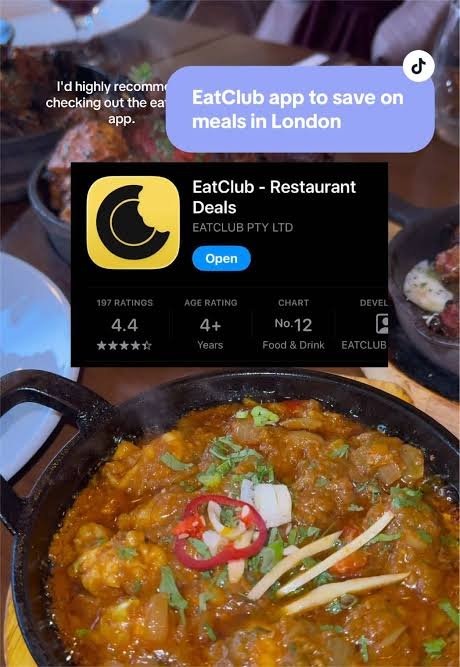
Example of the EatClub referral and promo saving
Suppose a new customer follows this process:
- They open the EatClub referral link:
https://links.eatclub.com.au/WkBstddJd5b - They create a new account.
- They receive the £10 referral benefit.
- They enter the EatClub code SUMMER15.
- They receive a £15 EatClub promo.
- They find a restaurant offering 30% off.
- Their restaurant bill is £100.
A 30% restaurant offer could reduce the underlying bill by £30.
The £10 EatClub referral and £15 EatClub promo could potentially provide a further £25 in value.
However, this does not necessarily mean the customer will pay only £45.
EatClub may apply the rewards in a particular order, impose a minimum spend, retain one reward for a future transaction or add a service fee. The customer should check the final payment amount shown in the app.
Does the EatClub discount include drinks?
EatClub promotes many offers as applying to the total restaurant bill, including drinks.
However, individual offers may exclude:
- Certain alcoholic drinks
- Set menus
- Special event menus
- Takeaway orders
- Gift cards
- Service charges
- Premium products
- Already-discounted menu items
Read the restaurant offer carefully before ordering.
Can you combine EatClub with other restaurant discounts?
EatClub offers normally cannot be combined with unrelated vouchers or third-party restaurant promotions.
You may not be able to use EatClub together with:
- Groupon
- Another restaurant-discount app
- A restaurant voucher
- A separate percentage-off promotion
- A gift experience voucher
- Another offer applied by restaurant staff
The EatClub referral and SUMMER15 promotion are both EatClub promotions, but customers should still confirm that the app permits them to be used together.
EatClub service fees
EatClub may charge a service fee on digital-card transactions.
The applicable fee should be shown in the app or payment information.
This means the final saving may be lower than the headline discount.
For example, a restaurant offer may give 30% off, but the customer’s net saving will be reduced slightly when the EatClub service fee is added.
The service fee is particularly relevant when using a smaller restaurant discount.
What happens if you cancel?
EatClub offers may include a cancellation deadline.
If your plans change:
- Open the active restaurant offer.
- Select the cancellation option.
- Confirm the cancellation.
- Check that the offer has been removed.
Late cancellation or failure to attend may result in a fee, depending on the current terms and the individual offer.
Do not simply ignore an active offer if you no longer intend to attend.
What could invalidate an EatClub offer?
Your restaurant discount, EatClub referral or EatClub promo could be affected if you:
- Register an account before using the referral link
- Use an existing EatClub account
- Create duplicate accounts
- Enter an expired EatClub code
- Arrive outside the permitted time
- Visit the wrong restaurant branch
- Exceed the maximum group size
- Fail to meet the minimum spend
- Make a separate booking for a walk-in offer
- Combine the offer with an external promotion
- Pay using your normal bank card
- Order excluded items
- Breach the offer conditions
Read all conditions before redeeming an offer.
Can you split the restaurant bill?
Splitting the bill may complicate the EatClub payment process.
The safest approach is usually for the eligible restaurant transaction to be paid through the activated EatClub digital card.
If different diners pay separately using ordinary bank cards, those payments may not receive the EatClub discount.
Some EatClub features may permit deal sharing or separate users to activate their own payment cards. Check the app before dining with a large group.
EatClub Dining Credit
EatClub may also provide Dining Credit through promotions, referrals, loyalty rewards or qualifying transactions.
Dining Credit can normally be used towards future eligible restaurant payments.
The £10 EatClub referral or £15 EatClub promo could potentially appear as:
- Promotional credit
- A voucher
- Dining Credit
- A first-transaction discount
- A wallet reward
Check the app to see how each benefit has been recorded and when it expires.
EatClub referral eligibility
To improve the chance of receiving the EatClub referral, the new customer should:
- Be completely new to EatClub
- Use the referral link before registration
- Register with a genuine mobile number
- Complete any verification
- Avoid duplicate accounts
- Confirm the reward appears
- Enter SUMMER15 before the first transaction
- Follow the restaurant-offer conditions
- Pay using the EatClub digital card
Referral rewards can be withheld, cancelled or reversed where EatClub believes that a registration is fraudulent, automated or otherwise ineligible.
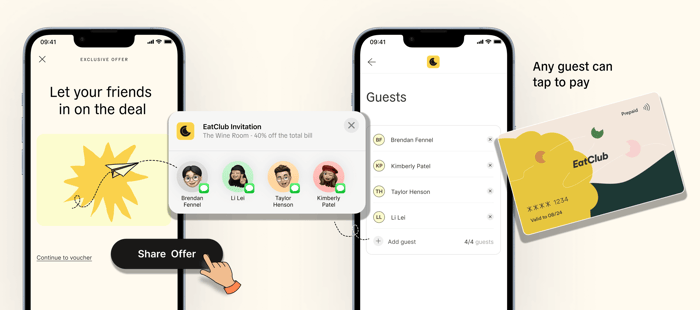
Important note about sharing EatClub referral links
EatClub’s referral terms may restrict how personal referral links can be distributed.
The current terms indicate that referrals should be made to people the referrer personally knows. EatClub may invalidate referral links that are posted publicly or distributed indiscriminately to strangers.
The EatClub referral link featured in this guide is:
https://links.eatclub.com.au/WkBstddJd5b
Customers should check the latest EatClub referral conditions before relying on the reward. A referral benefit should not be treated as guaranteed merely because the link opens or directs the user to the app.
What to do if the EatClub referral does not appear
If the £10 EatClub referral is missing:
- Check that you used the correct referral link.
- Confirm that you registered after opening it.
- Make sure you are a genuinely new customer.
- Check the wallet, rewards and promotions sections.
- Close and reopen the app.
- Take screenshots of the referral page.
- Contact EatClub before completing your first payment.
Referral link:
https://links.eatclub.com.au/WkBstddJd5b
What to do if SUMMER15 does not work
If the EatClub code SUMMER15 is rejected:
- Check the spelling
- Use capital letters
- Check whether the code has expired
- Confirm that you are a new customer
- Check whether it is limited to particular locations
- Check for a minimum spend
- Confirm that you have not already completed a transaction
- Review whether another promotion is preventing it from being added
The code must be entered as:
SUMMER15
Do not complete the first transaction until you understand whether the EatClub promo has been accepted.
Advantages of EatClub
Discounts of up to 50%
EatClub can provide substantial restaurant savings, especially during quieter dining periods.
Additional new-customer promotions
The EatClub referral and EatClub code SUMMER15 may provide up to £25 in introductory value.
Discounts may include drinks
Many EatClub offers apply to food and drinks, subject to individual conditions.
No printed voucher
The discount is generally processed through the EatClub digital card.
Restaurant discovery
EatClub can help customers discover nearby restaurants they may not have previously considered.
Flexible dining rewards
People who are willing to eat earlier, later or during quieter periods may find more generous discounts.
Potential disadvantages
Discounts are time-sensitive
The best restaurant offers may only be available during specific arrival windows.
Service fees apply
The final net saving may be lower than the advertised percentage.
Walk-in offers do not guarantee immediate seating
You may have to wait if the restaurant becomes busy.
Referral eligibility is restricted
A publicly distributed EatClub referral link may be invalidated under the referral terms.
Promotions can expire
SUMMER15 and the £10 referral reward may be withdrawn or changed.
The process requires a smartphone
Customers need the app, a compatible digital wallet and a supported payment method.
Is the EatClub app worth using?
EatClub may be worthwhile for customers who regularly eat out and can be flexible about restaurant choice and dining time.
It is particularly suitable for people who:
- Enjoy trying new restaurants
- Are comfortable with contactless mobile payments
- Can dine at off-peak times
- Want discounts on food and drinks
- Do not always require a confirmed reservation
- Are willing to check promotional conditions carefully
The potential combination of an EatClub referral, the EatClub code SUMMER15 and a restaurant percentage discount makes the app especially attractive to new users.
However, the customer should always confirm the actual offers shown in the app.
EatClub referral and EatClub code FAQs
What is the EatClub referral offer?
The EatClub referral described in this guide gives an eligible new customer £10 off after they register through a referral link.
What is the EatClub referral link?
Use:
https://links.eatclub.com.au/WkBstddJd5b
Open the link before creating an EatClub account.
What is the current EatClub code?
The EatClub code featured in this guide is:
SUMMER15
It is described as providing an additional £15 off for an eligible new customer.
How do I use the EatClub promo code?
Create a new account through the EatClub referral link, open the promotions or wallet section and enter SUMMER15 before the first qualifying transaction. You can enter the referral link even after registering – just make sure you haven’t completed your first booking. Add the SUMMER15 code during booking stage.
Can I use the EatClub referral and SUMMER15 together?
The promotional instructions state that customers can register through the referral link and then enter SUMMER15. This could provide up to £25 in introductory value.
Check that both promotions are visible in the app before dining.
Can existing customers use the EatClub referral?
The EatClub referral is intended for completely new customers. Existing or previous customers are unlikely to qualify.
Can I add an EatClub referral after registering?
Yes – as long as you have not made your first booking
Is SUMMER15 guaranteed to work?
No promotional code should be treated as guaranteed. Codes can expire, be withdrawn or be restricted by location, account status or minimum spend.
Is the £25 paid into my bank account?
No. The value will normally be provided as a restaurant discount, voucher, promotional credit or EatClub Dining Credit.
Do I show the EatClub code to the restaurant?
No. SUMMER15 should be entered inside the EatClub app. Restaurant discounts are normally applied through the EatClub digital card.
Do I need to tell restaurant staff about EatClub?
Usually not. The payment and discount process is handled through the digital card.
Can I use EatClub for takeaway?
EatClub primarily promotes dine-in restaurant offers. Check the individual offer to see whether takeaway transactions are eligible.
Does EatClub work throughout the UK?
EatClub is available in the UK, but restaurant coverage varies by location. Open the app to see participating venues near you.
Final summary
The EatClub referral and EatClub code SUMMER15 may provide a valuable introductory offer for new customers.
To use the promotions:
- Open the EatClub referral link:
https://links.eatclub.com.au/WkBstddJd5b - Download the EatClub app.
- Create a completely new account.
- Confirm that the £10 EatClub referral benefit is attached.
- Enter the EatClub promo code SUMMER15.
- Confirm that the additional £15 promotion has been accepted.
- Select an eligible restaurant offer.
- Arrive during the stated time.
- Pay using the EatClub digital card.
A qualifying customer could potentially receive up to £25 through the EatClub referral and EatClub promo, alongside a restaurant discount of up to 50%.
Referral rewards, promotional codes, restaurant offers, service fees and eligibility conditions can change. Always check the latest information displayed in the EatClub app before registering, dining or making a payment.
