Gains App Referral Code VJF3D7
Looking for a working Gains App referral code? Download the new Gains budgeting and cashback app and enter referral code VJF3D7 to qualify for £2 bonus cashback once you complete the referral requirements.
Gains App referral code
Referral code: VJF3D7
Referral reward: £2 bonus cashback
Who can use it: New Gains App customers
Available on: iOS and Android
UK requirement: You need a UK bank account and UK-issued debit card
App cost: Free, with an optional Gains Pro subscription
Download: Download Gains from the official Gains App website
Copy the Gains App referral code
VJF3D7
Download the app, create your account and enter VJF3D7 when asked for a referral or invite code.
The referral information available at the time of writing states that the £2 reward becomes payable after the new user has redeemed £10 in cashback. This means the bonus may not appear immediately after registration. You will need to use the cashback feature and complete the qualifying activity before the £2 bonus is unlocked.
How to use the Gains App referral code
Follow these steps to sign up and claim the referral offer:
- Visit the official Gains App website.
- Select the option to download Gains.
- Install the app from the Apple App Store or Google Play.
- Create a new Gains account.
- Enter referral code VJF3D7 when the app asks whether you have an invite or referral code.
- Complete the account-registration process.
- Connect an eligible UK bank account if you want to use the app’s personalised budgeting and cashback features.
- Browse the cashback offers available inside the app.
- Purchase digital gift cards for retailers where you already plan to shop.
- Earn and redeem the required £10 in cashback.
- Once the referral conditions have been satisfied, the additional £2 bonus cashback should be credited to your Gains balance.
Enter the referral code as early as possible during registration. If you skip the referral-code screen, you may not be able to add it retrospectively.
Get £2 bonus cashback with code VJF3D7
The important details are straightforward:
- Download the Gains App.
- Register as a new customer.
- Enter VJF3D7.
- Use the app’s cashback offers.
- Complete the £10 cashback redemption requirement.
- Receive the additional £2 referral reward.
Gains App referral code: VJF3D7
What is the Gains App?
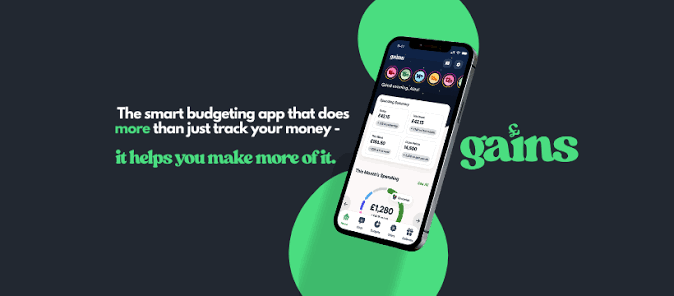
Gains is a new UK money-management app that combines three useful services in one place:
- Personal budgeting
- Instant gift-card cashback
- AI-powered money insights
Many finance apps concentrate on only one part of managing money. A budgeting app might show you where your money went, while a cashback app helps you earn a percentage back when shopping. Gains aims to combine both functions.
Once connected to your accounts using Open Banking, Gains can organise your transactions, show how much you are spending in different categories and identify cashback opportunities based on retailers you already use.
The idea is not simply to tell you to stop spending. Gains is designed to help you understand your finances and get more value from purchases you were planning to make anyway.
The app is associated with the team behind Up the Gains, a UK personal-finance education platform. It was co-founded by money educator Sammie Ellard-King alongside Jamie Dunmore and Chris Barnes. As a relatively new app, Gains is still building its track record, features and user base.
Gains Money App Ltd is registered in England and Wales under company number 16565380. The official Gains website describes the company as a registered agent of RiskSave Technologies Ltd, which is authorised and regulated by the Financial Conduct Authority under reference number 775330.
What does the Gains App do?
The app brings together spending analysis, budgeting, cashback and financial insights.
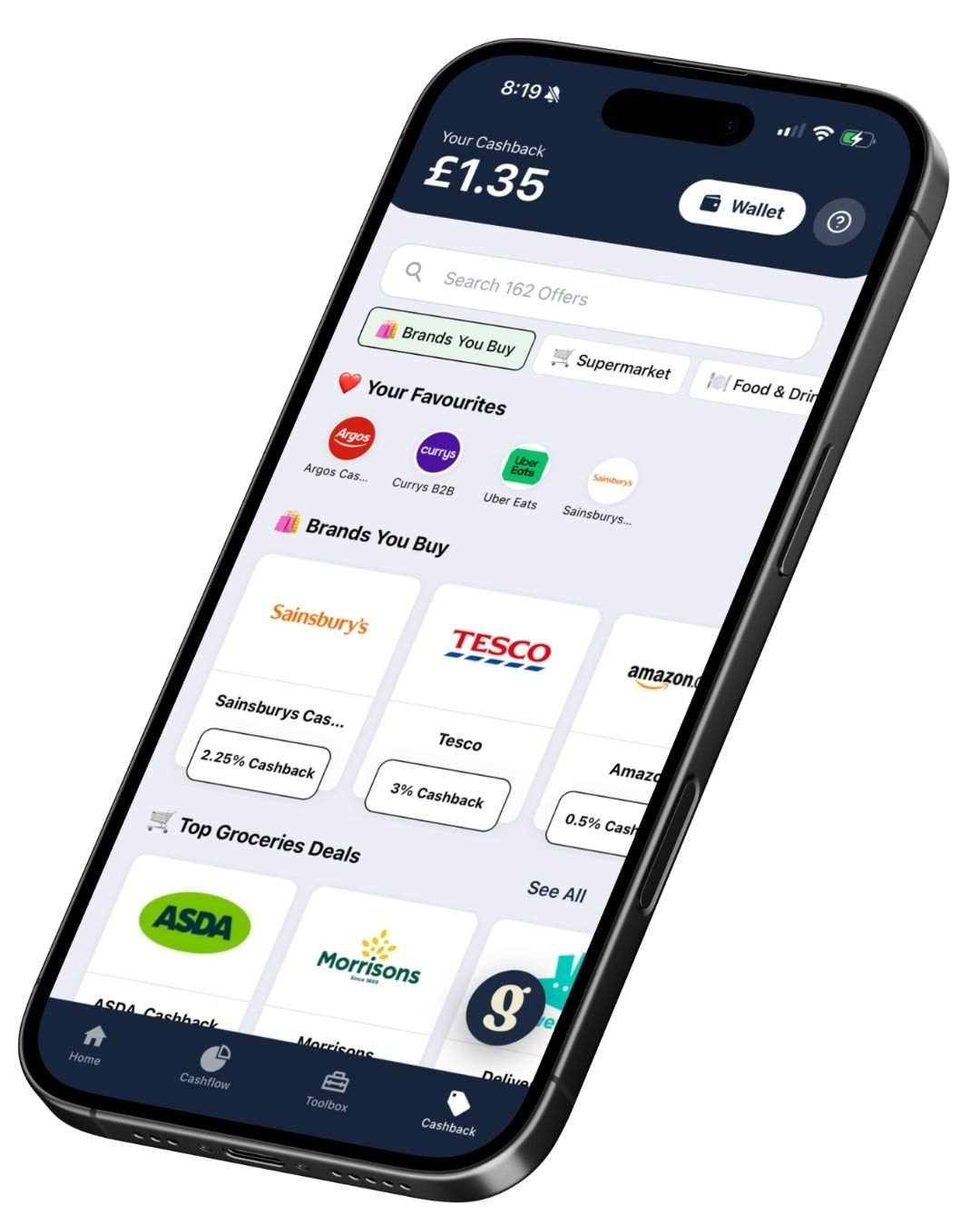
Personalised cashback offers
Gains analyses your spending patterns and can highlight cashback offers based on places where you already shop.
Instead of displaying hundreds of unrelated offers, the app attempts to prioritise relevant retailers. For example, if your connected transaction history shows regular supermarket, coffee-shop or clothing purchases, Gains can highlight suitable cashback gift cards.
The official Gains website currently advertises instant cashback offers from more than 200 brands. Retailer availability and cashback percentages can change, so check the current rate inside the app before purchasing a gift card.
Automatic spending categorisation
Once an account is connected, Gains can categorise transactions into areas such as:
- Groceries
- Shopping
- Travel
- Eating out
- Entertainment
- Household spending
- Bills and subscriptions
- Clothing
- Transport
Automatic categorisation can make it easier to understand how much you are spending without maintaining a manual spreadsheet.
No automated system will categorise every transaction perfectly, but the overview should give you a clearer starting point for reviewing your finances.
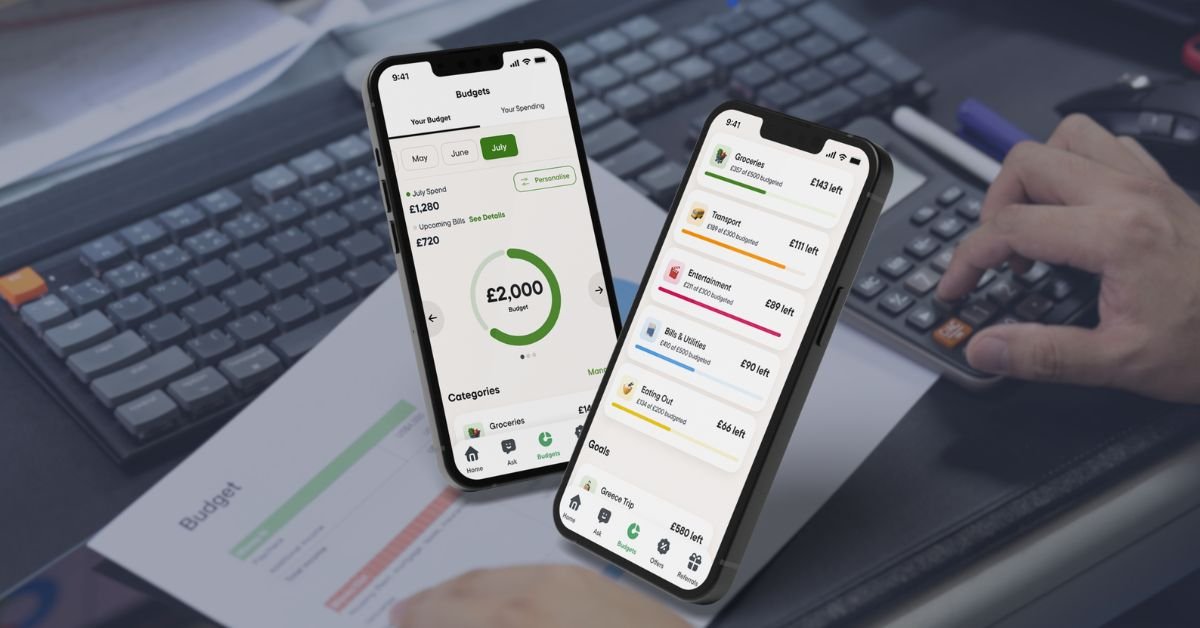
Monthly budgets
You can create an overall monthly budget and then divide it across different categories.
For example, you could set individual limits for:
- Food shopping
- Restaurants and takeaways
- Transport
- Clothing
- Entertainment
- Household purchases
- Subscriptions
This makes it easier to see whether you are on track throughout the month instead of discovering that you overspent after checking your account at the end of the month.
Savings goals
Gains also lets you create and monitor financial goals. These might include:
- Building an emergency fund
- Saving for a holiday
- Paying for Christmas
- Buying a car
- Creating a house deposit
- Clearing a credit-card balance
- Saving for a major purchase
Gains is not an interest-paying savings account, so the savings-goal feature is primarily a planning and progress-tracking tool. Your actual savings can remain in an appropriate bank or savings account.
AI money assistant
The app includes an AI-powered assistant that lets you ask questions about your money and spending.
Depending on the information available through your connected accounts, you may be able to ask questions such as:
- How much did I spend on takeaways last month?
- Which spending category has increased?
- How much am I spending on subscriptions?
- Where could I cut my monthly costs?
- Which retailers I use currently have cashback?
- Am I staying within my grocery budget?
- How much could I put towards my savings goal?
This conversational approach may be more accessible than searching through transaction lists or building formulas in a spreadsheet.
The free version includes access to the money assistant, while Gains Pro provides additional AI usage.
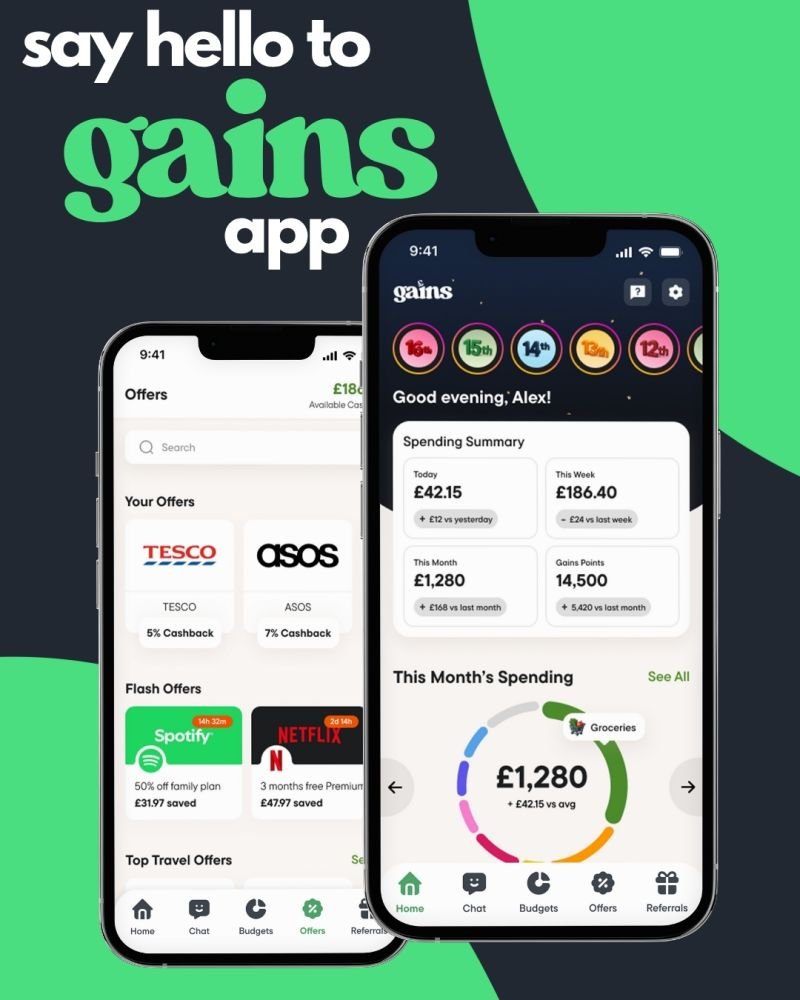
Spending summaries
Weekly and monthly summaries help users understand how their spending is changing.
A useful summary should show more than a total figure. It can help reveal whether spending has increased in a particular category, whether you remain within budget and where small recurring costs are adding up.
Subscription and recurring-payment insights
Connected transaction information can help identify regular payments, including subscriptions and bills.
This can be useful for spotting:
- Streaming services you no longer use
- Duplicate subscriptions
- Free trials that became paid plans
- Memberships you forgot to cancel
- Regular bills that have increased
- Services that may be available more cheaply elsewhere
Cancelling one unnecessary subscription could potentially save more than occasional cashback alone.
How does Gains App cashback work?
Gains cashback works through digital gift cards. You do not normally earn the advertised cashback simply by paying the retailer directly with your debit card.
The process works as follows:
- Open Gains before shopping.
- Search for the retailer you want to use.
- Check the current cashback percentage and gift-card conditions.
- Select the value of gift card you need.
- Pay for the gift card through a secure Open Banking payment.
- Receive the digital gift card.
- Receive the associated cashback in your Gains balance.
- Use the gift card with the retailer online or in a participating shop.
For example, if a retailer offers 5% cashback and you buy a £100 digital gift card, you would earn £5 cashback.
The major advantage is speed. Gains says cashback is normally credited as soon as the gift-card payment is confirmed, usually within 60 seconds. That is different from traditional click-through cashback websites, where a reward can remain pending for weeks or months.
The trade-off is that you must remember to buy the gift card before paying the retailer. If you complete the purchase using your normal bank card first, you generally cannot claim the gift-card cashback afterwards.
Popular Gains App cashback offers
Cashback rates change, so always rely on the live percentage displayed inside the Gains App.
As examples, the detailed Up the Gains review reported the following rates when checked in July 2026:
| Retailer | Example cashback rate | Category |
|---|---|---|
| Asda | 2% | Supermarket |
| Morrisons | 2% | Supermarket |
| Iceland | 2% | Supermarket |
| Sainsbury’s | 2.25% | Supermarket |
| M&S | 2.5% | Food and retail |
| Tesco | 3% | Supermarket |
| Boots | 3% | Health and beauty |
| Argos | 3.25% | General retail |
| Just Eat | 4% | Food delivery |
| Currys | 5% | Electricals |
| New Look | 8% | Fashion |
| Costa Coffee | 8% | Food and drink |
| Starbucks | 9% | Food and drink |
These are examples rather than guaranteed current rates. Participating retailers, gift-card denominations and cashback percentages can be updated at any time.
The best approach is to open the app immediately before shopping and confirm:
- The retailer is still available.
- The gift card can be used for your intended purchase.
- The cashback percentage has not changed.
- The gift card can be used online, in-store or both.
- Your chosen shop or product is not excluded.
How much must you spend to earn £10 cashback?
The amount required to generate £10 cashback depends on the rates offered by the retailers you use.
| Cashback rate | Spending required to generate £10 |
|---|---|
| 2% | £500 |
| 3% | Approximately £333.34 |
| 5% | £200 |
| 7% | Approximately £142.86 |
| 8% | £125 |
| 9% | Approximately £111.12 |
This does not mean you should spend more just to unlock the referral bonus. The sensible way to use Gains is to purchase gift cards for spending you were already planning.
For example, regular supermarket shops, coffee purchases, clothes, electrical items and household essentials could gradually build your cashback balance without requiring unnecessary purchases.
Once you have completed the referral programme’s £10 cashback redemption requirement, referral code VJF3D7 should unlock the additional £2 bonus cashback.
How much cashback could you earn with Gains?
Gains advertises an average cashback figure of approximately 7% and says its available offers could put as much as £1,091 per year back into a household’s pocket.
However, this is a modelled marketing estimate based on Office for National Statistics household-spending data and the cashback offers available through the app. It is not a guaranteed return for every user.
Your actual cashback will depend on:
- How much you normally spend
- Which retailers you use
- The live cashback percentages
- Whether you remember to buy gift cards before shopping
- Gift-card availability
- Whether purchases qualify
- How consistently you use the app
A regular customer of participating supermarkets and high-street retailers may find plenty of opportunities. Someone who rarely shops with the available brands may earn much less.
The real value of Gains is that it can provide cashback on ordinary spending while also helping you manage your wider budget.
How quickly does Gains cashback arrive?
According to Gains, cashback is credited to your Gains balance as soon as the gift-card payment is confirmed. This will usually happen within approximately 60 seconds.
That means you do not normally have to wait for a retailer to track and approve a purchase before seeing the reward.
The digital gift card should also become available for use after the payment has been processed. It can then be presented in-store or entered during an online checkout, depending on the retailer’s conditions.
How do you withdraw Gains cashback?
You have two main options for using your Gains cashback.
Use cashback towards another gift card
You can put your available cashback balance towards another digital gift-card purchase.
This can be an efficient way to keep earning because you can reuse the reward towards another purchase without waiting to reach the bank-withdrawal threshold.
Withdraw cashback to your bank
Gains says cashback can be withdrawn to a selected bank account once your balance reaches £10.
The Up the Gains review reports that bank withdrawals are made by BACS, are limited to one every 24 hours and currently carry a small 20p transfer fee. Check the app before withdrawing, as fees and withdrawal conditions can change.
Because the Gains App referral code VJF3D7 provides an additional £2 after the qualifying requirements have been completed, it can help increase your available cashback balance.
Is the Gains App free?
Yes. Gains offers a free version that provides access to its main cashback and money-management features.
The free version includes:
- Personalised cashback offers
- Digital gift-card cashback
- Spending categorisation
- Budget planning
- Savings-goal tracking
- Access to the AI money assistant
- Bank-account connectivity
The company earns a small amount from gift-card purchases, allowing it to provide the core service without requiring every user to pay a subscription.
Gains App free versus Gains Pro
Gains also offers an optional paid plan called Gains Pro.
Current advertised pricing is:
- £5.99 per month
- £49.99 per year
The annual plan represents a saving compared with paying monthly for 12 months.
| Feature | Gains Free | Gains Pro |
|---|---|---|
| Cashback offers | Included | Included |
| Digital gift cards | Included | Included |
| Basic budgeting tools | Included | Included |
| Money assistant | Included | More AI usage |
| Bank connections | Standard allowance | More connections |
| Budget customisation | Basic features | Additional tools |
| Custom spending categories | Limited | Included |
| Subscription price | £0 | £5.99 monthly or £49.99 annually |
You do not need Gains Pro to use referral code VJF3D7 or access the core cashback service.
The free version is likely to be sufficient for someone primarily interested in earning gift-card cashback and monitoring everyday spending. Pro may be more suitable for users with several accounts or those who want greater control over budgeting categories and AI features.
Before subscribing, compare the annual fee with the additional value you expect to receive. Paying £49.99 per year only makes sense if the premium features save you more money or time than the subscription costs.
Is Gains App safe?
Gains uses Open Banking to connect to participating UK accounts. The connection is provided through TrueLayer and is described as read-only for spending analysis.
This means Gains can view the transaction information you authorise it to access but cannot use that read-only connection to move money out of your account.
You are redirected to your own bank or banking app when approving the connection. Gains says it does not see or request your online-banking login details.
The company also states that it uses:
- 256-bit encryption
- Two-factor authentication
- Secure Open Banking technology
- A regulated Open Banking provider
- Revocable account access
Gains Money App Ltd is a registered agent of RiskSave Technologies Ltd. RiskSave is authorised and regulated by the Financial Conduct Authority under reference number 775330.
Gains itself is not a bank. Money remaining in your connected bank account continues to receive whatever protection normally applies to that account. Cashback held within Gains and unused digital gift cards should not be treated as bank deposits and do not receive the same Financial Services Compensation Scheme protection.
For that reason, it may be sensible to use cashback or withdraw it after reaching the required threshold rather than allowing a large balance to accumulate unnecessarily.
Why does Gains need access to your bank account?
The read-only Open Banking connection allows Gains to analyse your transaction history and provide personalised features.
This can help the app:
- Categorise your spending
- Build weekly and monthly summaries
- Monitor your budgets
- Identify recurring payments
- Highlight relevant cashback retailers
- Estimate where you could have saved money
- Answer questions through the AI money assistant
Connecting a bank account also allows Gains to show offers based on real spending patterns rather than generic assumptions.
You can revoke Open Banking permission if you no longer want the app to access your transaction information. You can usually manage these connections through either the Gains App or your bank.
Which banks work with Gains?
Gains is designed for customers with a UK bank account and UK-issued debit card. It connects through Open Banking and should work with many major UK banks, building societies and participating financial providers.
Supported institutions can change, so check the connection list displayed during registration.
If you use several current accounts or credit cards, the free version may limit how many you can connect. Additional account connections are one of the benefits offered through Gains Pro.
Advantages of the Gains App
Cashback can be credited quickly
Gift-card cashback is normally credited as soon as the payment is confirmed, avoiding the long pending periods associated with some conventional cashback websites.
It combines cashback and budgeting
You do not need to use one app to track spending and another to search for rewards. Gains places both functions together.
Offers are personalised
The app can use your spending history to highlight retailers relevant to you instead of presenting an unfiltered catalogue.
The core app is free
You can access cashback and basic budgeting features without paying for Gains Pro.
It covers everyday spending
The brand selection includes categories such as supermarkets, coffee shops, clothing, electricals, travel and household shopping.
Cashback can be reused
You can put cashback towards another gift-card purchase without waiting to reach the £10 bank-withdrawal threshold.
The AI assistant simplifies financial questions
Being able to ask a question in everyday language may make money management easier for people who dislike spreadsheets or complicated budgeting software.
New customers can receive a referral bonus
Entering the Gains App referral code VJF3D7 gives eligible users an opportunity to receive £2 bonus cashback after completing the qualifying cashback requirement.
Disadvantages and points to consider
You must buy a gift card first
You normally need to purchase the correct digital gift card before paying. If you forget and pay the retailer directly, you may miss the cashback.
Gift cards reduce flexibility
Once you have bought a retailer-specific gift card, the money generally needs to be spent with that retailer. Check the gift-card expiry date and conditions before purchasing.
Cashback rates vary
The highest advertised percentage will not apply to every shop. Supermarket rates may be lower than offers from fashion or hospitality brands.
There is a bank-withdrawal threshold
You need at least £10 in your Gains cashback balance before withdrawing it to your bank.
It is a new app
Gains has a shorter public track record than established cashback and budgeting services. Features and conditions may evolve as the product develops.
Some advanced tools require Gains Pro
Users who want additional bank connections, more AI use or advanced budgeting customisation may need the paid subscription.
It is not a savings account
Gains can help track savings goals, but it does not provide an interest-bearing savings pot.
Who is the Gains App best for?
Gains may be particularly suitable for:
- UK shoppers who want cashback on regular spending
- People who frequently shop at participating supermarkets
- Users who want budgeting and cashback in one app
- Beginners who find spreadsheets intimidating
- Anyone who wants a clearer view of monthly spending
- People with forgotten subscriptions or recurring payments
- Shoppers comfortable using digital gift cards
- Users who want cashback credited more quickly
- Anyone looking for personalised rather than generic offers
It may be less suitable for someone who does not want to connect a bank account, dislikes paying with gift cards or rarely shops with participating retailers.
Tips for getting the most from Gains
Enter the referral code during registration
Use VJF3D7 when creating your account so that your profile is connected to the £2 referral offer.
Only buy gift cards when you are ready to shop
Avoid tying up money in retailer-specific gift cards that you may not use.
Check the live rate every time
Cashback rates can increase or decrease. Confirm the percentage before purchasing.
Start with regular spending
Supermarket shopping, household essentials and planned purchases are the easiest areas in which to build consistent cashback.
Use the exact gift-card value you need
Where the retailer permits flexible denominations, buy close to the amount you plan to spend.
Combine cashback with retailer promotions
A gift card can often be used to pay for products already reduced by the retailer, although you should check the individual offer terms.
Do not overspend for cashback
Cashback only saves money when the underlying purchase is necessary or already planned.
Review spending summaries regularly
The budgeting side of Gains may save more than the cashback feature if it helps identify unnecessary subscriptions or repeated overspending.
Compare Gains Free and Pro
Start with the free version. Upgrade only if the additional budgeting tools, AI usage and bank connections provide enough value.
Gains App referral code FAQs
What is the Gains App referral code?
The referral code featured in this guide is:
VJF3D7
New users can enter this code to qualify for £2 bonus cashback after completing the referral requirements.
How much is the referral bonus?
The current referral reward is £2 in bonus cashback.
Is the £2 paid immediately?
No. Current programme information states that the referred user must redeem £10 in cashback before the £2 referral bonus is awarded.
Where do I enter the Gains referral code?
Enter VJF3D7 in the referral or invite-code field when creating your Gains account. It is best to add the code during initial registration.
Can I add VJF3D7 after registering?
Referral codes are often designed to be entered during sign-up. If you have already completed registration and cannot find a referral-code option, contact Gains support before completing the qualifying activity.
Is VJF3D7 a public promotional code?
It is a personal Gains referral code being shared through this guide. Gains users receive their own invite details rather than the company providing one universal referral code for everyone.
Do I need to pay for Gains Pro?
No. Gains Pro is optional. You can use the free version of the app to access cashback offers and qualify for the referral reward.
Is Gains available on Android?
Yes. Gains is available for both Android and iOS devices.
Can I use Gains outside the UK?
Gains currently supports customers with a UK bank account and UK-issued debit card. Support for additional regions may be introduced in the future.
Is the cashback automatic when I use my debit card?
No. You normally need to purchase a participating retailer’s digital gift card through Gains before shopping.
How quickly is cashback credited?
Gains says cashback is generally credited when the gift-card payment is confirmed, normally within approximately 60 seconds.
What is the minimum cashback withdrawal?
You need £10 in earned cashback before you can withdraw money to your selected bank account.
Can I use cashback before reaching £10?
Yes. Gains says you can use your available cashback towards another gift-card purchase without waiting to reach the bank-withdrawal threshold.
Is Gains a bank?
No. Gains is a budgeting and cashback app, not a bank account or savings provider.
Does Gains pay interest?
No. Gains does not offer an interest-bearing savings account. Its savings-goal feature helps you plan and monitor progress.
Can I revoke access to my bank information?
Yes. Open Banking permission can be revoked if you no longer want Gains to access your transaction information.
Is the Gains App referral code worth using?
Yes. If you are planning to join Gains, there is a clear benefit to entering referral code VJF3D7.
The £2 bonus is not a huge amount on its own, but it is an additional reward for using an app that can continue generating cashback on everyday purchases. There is no need to pay for Gains Pro to access the core service, and the bonus can help build your cashback balance.
The main requirement is that you must first earn and redeem the qualifying £10 cashback. How quickly you achieve that will depend on where you shop, how much you spend and the cashback rates available.
The best strategy is to use Gains for purchases you were already going to make. Buying supermarket, coffee-shop, fashion or household gift cards before shopping can gradually build cashback without increasing your normal spending.
Final verdict
Gains is an interesting addition to the UK money-app market because it brings budgeting, cashback and AI-powered insights into one platform.
Its instant gift-card cashback system can be more convenient than waiting months for a conventional cashback purchase to be approved. The budgeting tools can also help users understand where their money goes, set category limits and work towards financial goals.
The app is still relatively new, and it requires users to develop the habit of buying a digital gift card before shopping. However, its free core service, wide retailer selection and combination of money-management features make it worth considering.
For the best start, download Gains and enter the referral code below.
Use the Gains App referral code VJF3D7
Referral code: VJF3D7
Reward: £2 bonus cashback
Qualification: Complete the applicable £10 cashback redemption requirement
Cost: Gains is free to download and use, with optional Pro features
Download Gains from the official website
Make sure you enter VJF3D7 during registration so your account is linked to the referral promotion.
Referral disclosure: This article contains a personal referral code. If you use VJF3D7 and complete the qualifying requirements, you can receive £2 bonus cashback and the referrer may also receive a reward. Referral conditions, retailers and cashback rates can change, so check the current information displayed inside the Gains App.
